DIY hand-held games console: Faster GUI
Last updated: 19 Apr 2023 - 22:19
It's been a while since I got anything done on the Noodle Game console, but I found it on my desk and had a few minutes to spare so thought I'd have a crack at upgrading the screen driver code. It was a little bit of a disappointing exercise but at least I've learned some things.
Stuck in 24 bit
The screen supposedly supports a bunch of different colour depths including 18 bit (6 bits of each colour) note that this isn't a nice multiple of 8, a 16 bit mode where green has 6 bits but red and blue only 5 and apparently even a 3 bit mode where it has just one bit per colour like a Sinclair Spectrum. Unfortunately in SPI mode it only supports either the 8 bit or the full 18 bit modes. In 18 bit mode the colours are padded to a full byte each and so need three bytes per pixel.
Slow clock
The screen module I've got is hard-wired to SPI mode. The module can do parallel RGB, host bus or even MIPI-DSI apparently all of which offer faster data transfers and a choice of colo
Surface Tension
Last updated: 19 Apr 2023 - 21:43
Just less than a year ago I decided it would be interesting to try out a Microsoft Surface as an alternative to an Android tablet and maybe more portable than my venerable ThinkPad T430. I got a cheap unit from eBay to try it out, it's a Surface Pro 5 so pretty old now. Of course I didn't want to use Windows on it and I was thrilled with how easy getting a nice Linux install was on this very Microsoft hardware. I didn't do anything particularly special to get it running, just followed the instructions on GitHub.
For the most part my experience with the platform was good. Performance was pretty good. The pen and touch screen worked pretty well. I used it for coding, PCB layout, lots of FreeCAD work and even a bit of gaming via Steam. I only had 8GB of RAM which would probably have been okay but the ultra high definition display meant that apps were taking a lot more RAM than I'd expected and it very easily ran out of memory.
Debugging STM32 Inside VSCode
Last updated: 24 Oct 2022 - 20:47
In my current series on building my own handheld games console I've been developing for the STM32 inside VSCode. It's a reasonably comfortable IDE that works well on Linux and there's the STM32-for-VSCode extension.
That extension aims to automate everything for you but as usual with embedded development not everything is quite that joined up...
DIY hand-held games console: GUI Framework
Last updated: 22 Oct 2022 - 23:00
Now that the screen lights up and displays something, next on my list was a way to make the screen show useful things dynamically with as little code as possible. I decided to go with LVGL which is a framework for creating embedded GUIs on small graphical displays. It's implemented in C and is impressively flexible whilst leaving the programming interface familiar to anyone who's used Qt, GTK etc.
DIY hand-held games console: Screen Driver
Last updated: 13 Jul 2022 - 22:40
Now that the toolchain and the basics are working, the next thing to do is to start getting some of the peripherals working. I like to do this one at a time and it's usually best to start with the outputs first, that way you can use the outputs to test whether the inputs are working. We've proven the basic UART comms already, so the next big output device is the screen. The screen I've got came from eBay but appears to match up with this entry on LCD Wiki.
DIY hand-held games console: Hello World
Last updated: 02 Jul 2022 - 23:53
I've got a collection of parts on hand left over from various projects or bought for projects that never started, so I'm going to try and build a system as a prototype. The core of the system is the STM32F429 which I have on a "Discovery board". The one I'm using is the original production run STM32F429I-DISCO board which has long since been replaced by the STM32F429I-DISC1 board. As far as I can see the only real difference between these is a newer ST-Link which supports virtual serial port as well as SWD/JTAG programming. While more convenient all I need for the old board is an extra serial to USB adapter which I have anyway.
DIY hand-held games console
Last updated: 29 Jun 2022 - 22:40
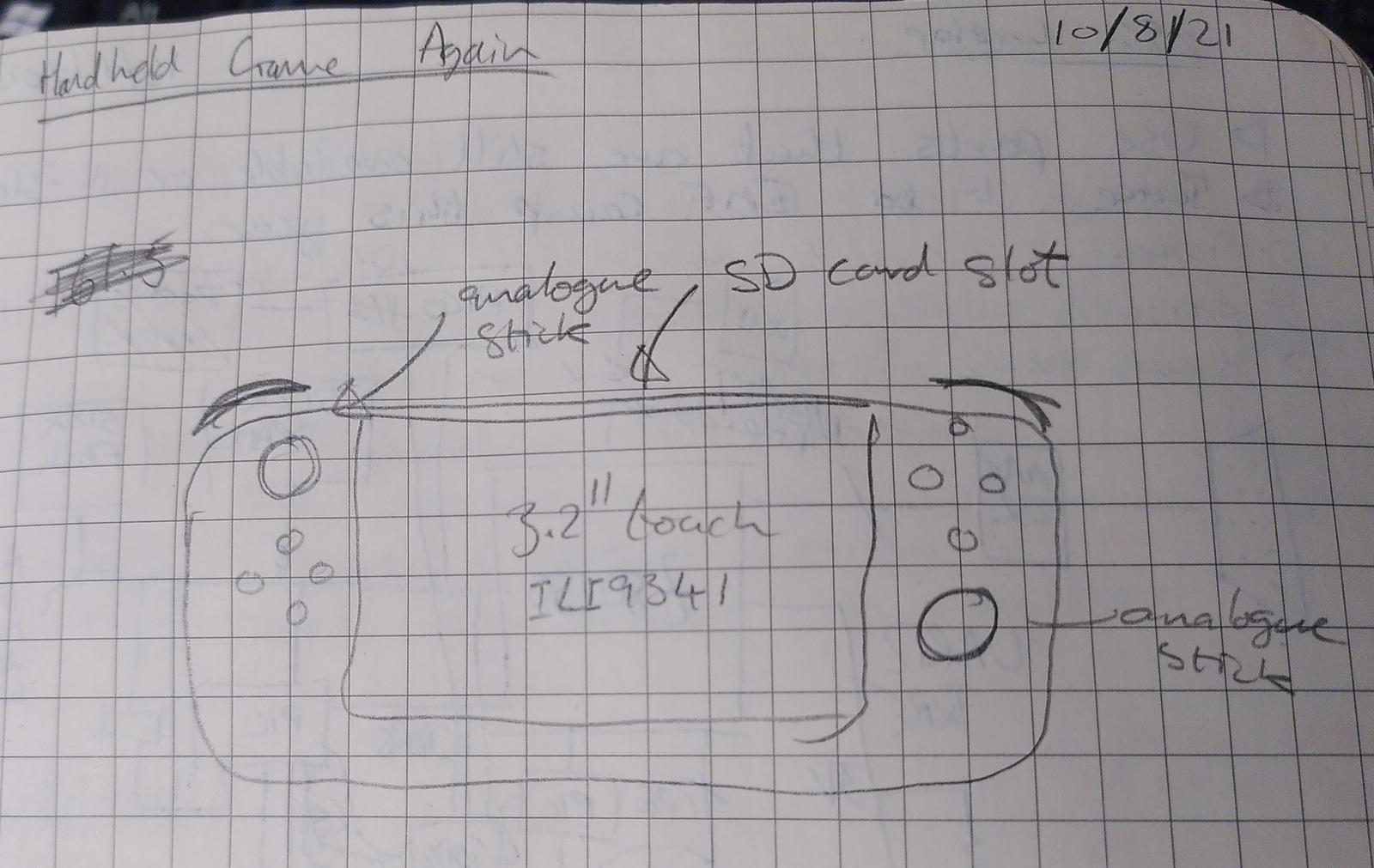
First Sketch: First sketch drawing of what I want to create.
I've decided to have another crack at a hand-held games console project. I've had various ideas for doing this over the years. I built one based around a PIC18F4520 many years ago but didn't get far with trying to write the software for it. More recently (but still long ago) I had the idea that maybe the OggBox might make a simple console, if you hold it sideways the 4 buttons under one hand and the top two buttons in the other hand. Last year I got most of the way through designing one in my summer holiday, but the parts are all now out of stock and it was based on a PIC32 which I've now decided is a very bad idea having had to use them professionally since.
The chip supply crisis is still in full effect and I have almost no free time so this is going to be an interesting challenge, but I thought I'd document my process from the beginning this time and see where I get.
Bitmap font editor tool
Last updated: 11 Nov 2020 - 14:36
In a project I am currently working on I needed a font to embed in the ROM of an ARM Cortex micro-controller that could be used on one of these ChLCD modules from SparkFun. The display in my application is currently mounted in a landscape orientation, but I didn't want to preclude using it the other way around, or changing the font. I've written a few bitmap font editors over the years for various graphical LCDs, VGA displays and LED matrix displays. They all have a common interface, a character being edited with oversized pixels and a preview of the entire font. I decided this time to do a "proper job" of the code and write a Python GUI app that should be cross-platform and allows saving and loading of fonts.
Midas Graphic OLED
Last updated: 11 Nov 2020 - 11:31
I recently included a Midas Graphic OLED 128x32 pixel display in a product I'm developing at work. The OLED is available from Farnell for a very reasonable £7.61. It's got a 0.1" pitch header for comms and 4 M2 mounting holes which makes it ideal for DIY/prototype products that don't have custom enclosures to mount a bare LCD glass panel nicely.
The big problem is the documentation which is worse than non-existent. It's confusing, misleading and in places just plain wrong. The datasheet seems to have been assembled by someone copying and pasting bits from the controller datasheet with no understanding of what the product does.
I eventually figured it out and got it working, so here are my notes.
Virtual Show
Last updated: 04 Aug 2020 - 22:54
My Wife has been helping to organise the arts, crafts & cookery section of the local agricultural show for several years. The show was cancelled for the first time in 19 years due to the COVID-19 lockdown this year and to keep it going in some way she suggested and helped organise a virtual show. You can see the entries online still at https://virtual-stithians.show. To manage the content we first looked at off-the-shelf Wordpress gallery solutions but they were not a good fit. Hosting it on Instagram or Facebook had been suggested but would have excluded a lot of the regular entrants so an email-in solution was picked to be most inclusive. In the end the show had over 250 entries.
I volunteered to write a custom site, and since Django is my preferred platform these days I wrote it in that. It was my first significant Django project in a number of years and the first time working in Python3 but as it promises the framework delivered a robust interface with minimal effort.